
Lato’s B2B collaboration features let travel professionals — like tour operators, DMCs, and travel agents — share proposals with collaborators. This guide explains how you can invite collaborators, how they can access shared trip proposals, and streamline cooperation between partners for faster, more effective trip planning.
Sharing Your Trip With a Collaborator
Open one of your trips
Click on the Share section
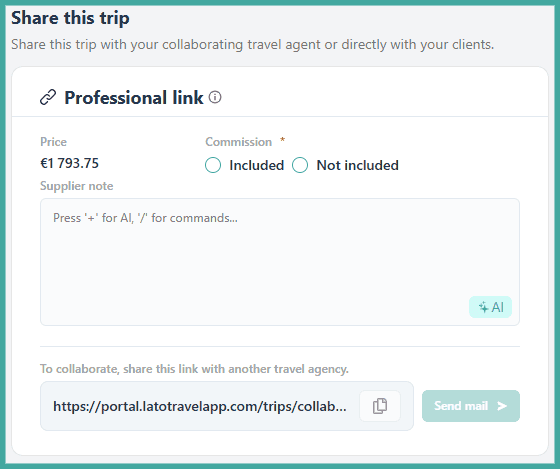
Go to the "Professional link" box
If you've set a price for the trip, please choose if it includes commission, or if it does not include commission
If you didn't set a price, you don't have to use the commission option
If you have any extra information for the collaborator, please use the "Supplier note" box
After selecting one of the options or changing the supplier note, press "Save" on the upper right corner
Copy the link and share it or send a direct email
NOTE: The Commission field is mandatory if you've set a price. You won't be able to share the trip if you don't choose one of the options and save at the end
TIP! You can also get a link directly on the Trips menu by clicking on the trip's three dots and choosing the "Get a professional link" option
Collaborator's Guide for Using Lato
How to Access a Forwarded Travel Proposal
Click on the collaborator link you received from the travel professional
Click on "Discover the journey"
Log in on your Lato account or register a free Lato account
Note
Any general changes to the proposal (client names, hotels, activities, etc.) have to be requested with the trip provider.
How to Edit the Travel Proposal and What You can Edit
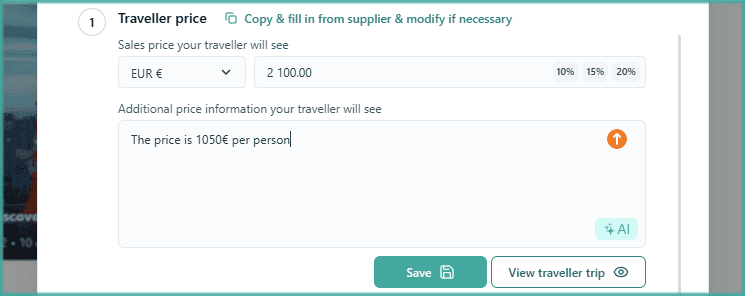
You can edit the Price on the travel proposal, or set a margin from the shown percentages
Write additional information about the price and the trip for your travellers
You can also click on the "Copy & fill in from..." link to get pre-filled information from your supplier that you can edit
Click on Save
Notes:
Other trip details cannot be changed by the collaborator, only by the trip provider
Click on "View traveller trip" to see how it will look for your travellers
How to Share the Travel Proposal with Travellers

Share this trip with your travellers by using the "Copy the traveller link..." button
Send the generated link to your traveller using your preferred method
NOTE: The link button will remain disabled until you fill in a price or additional information.
How to Change the Branding on the Travel Proposal

You can also add your custom branding to your collaboration trip proposal
Click on "Branding settings" and you'll be redirected to your company branding settings
See here how you can customise your branding
After having changed the branding, you can share the trip with your travellers using the instructions above