
In Lato, you can use digital vouchers to include service confirmations directly within a trip itinerary so travellers can easily access and redeem them. Digital vouchers help keep travel documents organised and accessible, reducing confusion and improving the traveller experience. This guide explains how to add voucher files, where they appear for travellers, and best practices for managing voucher content in your trips.
How to Activate a Digital Voucher
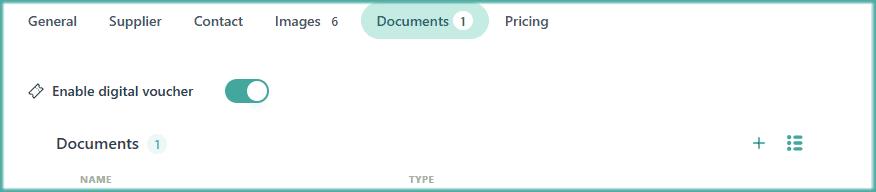
Open a Trip
Go to Itinerary
Open the Day-by-Day or Board tab
Find the Activity or the Accommodation you want to activate the digital voucher for
Open it and go to the Documents section
Click on the "Enable digital voucher" toggle to turn it on or off
Save your changes
NOTE: The digital voucher will now be visible for the travellers on the travel app, next to the activity or accommodation it refers to. Learn how and when to show the vouchers on our documents/booking visibility settings.
How to Manage Digital Voucher Display
Choose if vouchers will show up for your travellers before the trip is booked, when it's booked or never.
General Digital Voucher Display Settings

Go to the main Settings
Open the Trip section
Scroll down to the Documents tab
Choose when you want the documents/vouchers to be shown
Save the changes
Digital Voucher Display Settings for a Specific Trip

Open a Trip
Go to Settings
Scroll down to the Documents section
Choose when you want the documents/vouchers to be shown
Save the changes
Finding Digital Vouchers in the Lato Travel App
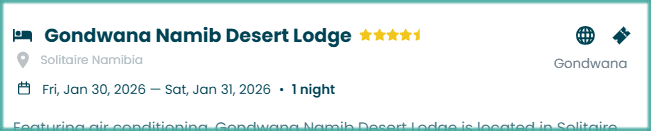
Open the Lato Travel App
Go to one of the itinerary days
Find the activity or accommodation you want
Click on the digital voucher icon (🔖) to open it