
In Lato, you can reorder elements within a trip day to customise the sequence of activities, accommodations, transport options, and other itinerary items. Adjusting the order helps you tell a better travel story — whether you’re prioritising sightseeing first or rearranging travel segments for smoother logistics. This guide walks you through how to drag and drop elements into your preferred sequence, keeping your daily plan organised and easy to follow.
(Our product evolves quickly, and this video may not show the latest updates)
How to Reorder Elements
Choose a day in your trip's "Board" or "Day by Day" section
Find and select the element you want to reorder
Two ways You Can Reorder the Element
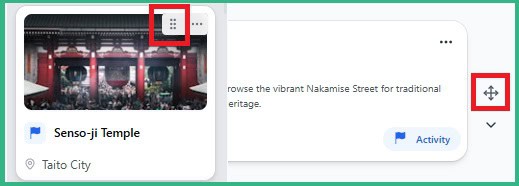
Drag and Drop: Click and hold the move icon (six dots or cross ) to the right and drag and drop the element to the desired position
Arrow Keys: Use the arrow icons to move the element up or down